

What is the difference between let, const, and var in JavaScript?
let is block-scoped and reassignable; const is block-scoped and NOT reassignable; var is function-scoped and reassignable ✅var is block-scoped; let and const are function-scopedconst can be reassigned after declarationlet — block-scoped (inside {}), can be reassigned but not redeclared in the same scope. const — block-scoped, CANNOT be reassigned after initialization (but objects/arrays can be mutated). var — function-scoped, can be reassigned and redeclared, gets hoisted. Modern best practice: use const by default, let when reassignment is needed, avoid var. This is the #1 JavaScript interview question.What does typeof null return in JavaScript?
"null""object" ✅"undefined""boolean"typeof null returns "object" — this is a well-known JavaScript bug from the first version that was never fixed for backward compatibility. The 8 data types in JavaScript: 7 primitives (string, number, boolean, null, undefined, symbol, bigint) + object (arrays, functions, and objects are all objects). Knowing typeof quirks is essential for interviews.What is the difference between == and === in JavaScript?
== checks value with type coercion; === checks both value AND type (strict equality) ✅=== compares values; == compares types== is strict; === is loose== (loose equality) performs type coercion before comparison — "5" == 5 is true because the string is converted to a number. === (strict equality) compares BOTH value AND type — "5" === 5 is false because string ≠ number. Best practice: always use === to avoid unexpected coercion bugs. This produces some classic JavaScript quirks: 0 == "" is true, 0 == false is true.Functions & Scope
Building Blocks of JavaScript
What is an arrow function in JavaScript and how does it differ from a regular function?
=> that does NOT have its own this binding — it inherits this from the enclosing scope ✅this contextconst add = (a, b) => a + b;) provide concise syntax introduced in ES6. Key differences from regular functions: (1) No own this — they inherit this from the surrounding scope (lexical this). (2) Cannot be used as constructors (no new). (3) No arguments object. (4) Implicit return for single expressions (no return keyword needed). Arrow functions are ideal for callbacks, array methods, and short functions.What is a closure in JavaScript?
function counter() { let count = 0; return () => ++count; } — the returned function retains access to count. Closures enable data privacy, function factories, and modules. They are fundamental to JavaScript and one of the most asked interview concepts.What is “hoisting” in JavaScript?
var declarations are hoisted and initialized as undefined. let/const are hoisted but NOT initialized — accessing them before declaration causes a ReferenceError (Temporal Dead Zone). Function declarations are fully hoisted (can be called before they appear in code). Function expressions and arrow functions are NOT hoisted.Arrays & Objects
Working with Data Structures
Which array method creates a NEW array by applying a function to each element of the original array?
forEach()map() ✅filter()reduce()map() transforms each element and returns a NEW array of the same length. Example: [1,2,3].map(x => x * 2) returns [2,4,6]. forEach() loops through elements but returns undefined (no new array). filter() returns a new array with elements that pass a condition. reduce() accumulates all elements into a single value. These four methods are essential for modern JavaScript and heavily tested in interviews.What is destructuring in JavaScript?
const [a, b] = [1, 2]; — a=1, b=2. Object: const {name, age} = {name: "Ali", age: 25}; — name=”Ali”, age=25. You can set defaults: const {name = "Guest"} = {};. Also works in function parameters: function greet({name}) {}. Destructuring makes code cleaner and is used everywhere in modern JavaScript and React.What is the spread operator (...) used for in JavaScript?
... expands an iterable into individual elements. Copy array: [...arr]. Merge arrays: [...arr1, ...arr2]. Copy object: {...obj}. Merge objects: {...obj1, ...obj2}. Function arguments: Math.max(...numbers). The rest parameter (same syntax) collects remaining arguments: function sum(...nums) {}. Spread creates shallow copies — nested objects are still referenced.ES6+ Features & Async JavaScript
Modern JavaScript & Asynchronous Programming
What is a Promise in JavaScript?
promise.then(result => ...).catch(error => ...). Promises replaced callback hell and are the foundation of modern async JavaScript. async/await is syntactic sugar over Promises that makes async code look synchronous.What do the async and await keywords do in JavaScript?
async declares a function that returns a Promise; await pauses execution until the Promise resolves ✅await can be used anywhere in the codeasync function fetchData() { const data = await fetch(url); }. async makes a function always return a Promise. await pauses execution until the Promise settles — it can ONLY be used inside an async function (or at the top level of ES modules). Use try/catch with async/await for error handling. async/await is the modern standard for handling API calls, database queries, and file operations in JavaScript.What is the event loop in JavaScript?
What are template literals in JavaScript and how do you use them?
`) that support embedded expressions with ${expression} and multi-line strings ✅`) instead of quotes. Features: (1) String interpolation — `Hello ${name}, you are ${age} years old`. (2) Multi-line strings — no need for \n. (3) Expression evaluation — `Total: ${price * quantity}`. (4) Tagged templates — advanced string processing. Template literals replaced messy string concatenation ("Hello " + name) and are the standard way to build strings in modern JavaScript.What does console.log([1,2,3] === [1,2,3]) output?
truefalse ✅undefinedfalse — because arrays (and objects) are compared by reference, not by value. [1,2,3] and [1,2,3] are two different objects in memory, even though they have the same contents. To compare array contents, use: JSON.stringify(arr1) === JSON.stringify(arr2) or arr1.every((val, i) => val === arr2[i]). This reference vs value distinction applies to all objects in JavaScript — primitives compare by value, objects compare by reference.📦 JavaScript Data Types (8 Types)
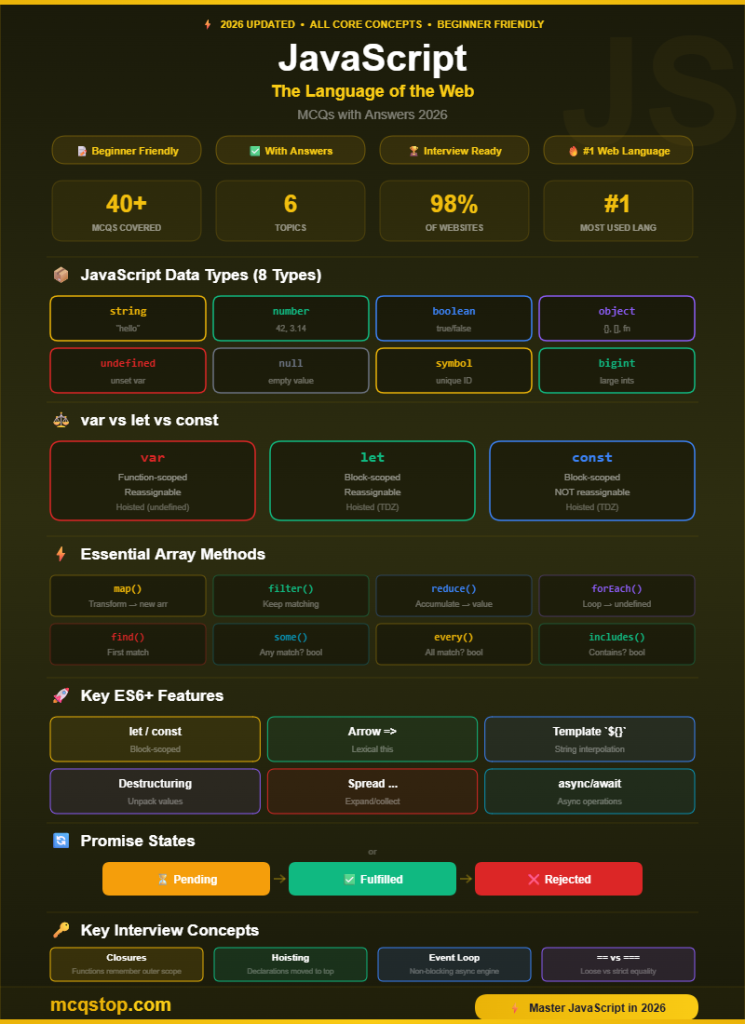
⚡ Essential Array Methods
→ new array
→ new array
→ single value
→ undefined
→ element
→ boolean
→ boolean
→ boolean
🚀 Key ES6+ Features
🔄 Promise States
💡 JavaScript Interview & Study Tips
arr.filter(...).map(...).reduce(...).🎯 Keep Practicing — More MCQs Available!
We update our question bank regularly to cover more JavaScript topics
Frequently Asked Questions
Basic JavaScript (variables, functions, arrays, DOM manipulation) can be learned in 2-4 weeks. Intermediate JavaScript (closures, async/await, ES6+, APIs) takes another 2-4 months. Mastering a framework like React takes additional 2-3 months. Most junior developer job requirements can be met with 4-6 months of consistent daily practice.
It depends on your goals. JavaScript is essential for web development (frontend + backend with Node.js). Python is better for data science, AI/ML, and automation. For web development careers, start with JavaScript. For data careers, start with Python. Both are beginner-friendly, hugely popular, and highly paid. Many developers learn both within their first year.
Absolutely — JavaScript is the #1 most used programming language for 12+ consecutive years (Stack Overflow survey). It powers 98% of all websites, runs on every browser, and extends to mobile apps (React Native), desktop apps (Electron), server-side (Node.js), and even machine learning (TensorFlow.js). There are more JavaScript job postings than any other programming language.
There’s no single industry-standard JavaScript certification like CompTIA or AWS. However, options include: OpenJS Node.js certifications (JSNAD, JSNSD), W3Schools JavaScript certification, and Meta Front-End Developer Certificate (Coursera). For most employers, a strong portfolio of JavaScript projects and performance on coding challenges matters more than any specific certification.




Leave a Comment