

What is a Docker container?
What is the key difference between a Docker container and a virtual machine (VM)?
Which command runs a new Docker container from the nginx image in detached mode (background) and maps port 80 on the host to port 80 in the container?
docker run -d -p 80:80 nginx ✅docker start -p 80:80 nginxdocker create -d -p 80:80 nginxdocker exec -d -p 80:80 nginxdocker run creates and starts a new container. The -d flag runs it in detached (background) mode. -p 80:80 maps host port 80 to container port 80 (host:container). docker start restarts an existing stopped container. docker create creates but doesn’t start. docker exec runs a command inside a running container. Knowing these commands and flags is essential for the DCA.What happens to data stored inside a Docker container when the container is deleted?
docker volume create) or bind mounts. Volumes are stored in /var/lib/docker/volumes/ and are managed by Docker. Bind mounts map a host directory into the container. For databases and stateful applications, volumes are essential. This is a fundamental Docker concept.Image Creation & Management
Dockerfile, Build, Registry
Which file contains the instructions for building a Docker image, specifying the base image, commands, environment variables, and exposed ports?
Dockerfile ✅docker-compose.yml.dockerignoreconfig.jsonFROM (base image), RUN (execute commands during build), COPY/ADD (add files), WORKDIR (set working directory), EXPOSE (document ports), ENV (set environment variables), CMD/ENTRYPOINT (default command). docker-compose.yml defines multi-container applications. .dockerignore excludes files from the build context.What is the difference between CMD and ENTRYPOINT in a Dockerfile?
CMD sets the default command and arguments — it can be overridden by passing arguments to docker run. ENTRYPOINT configures the container as an executable — it always runs and cannot be easily overridden (use --entrypoint flag). Best practice: use ENTRYPOINT for the main command and CMD for default arguments. Example: ENTRYPOINT ["python"] + CMD ["app.py"] — users can override app.py but python always runs.What is a multi-stage build in Docker and why is it used?
FROM statements. Stage 1 compiles/builds the application (large image with build tools). Stage 2 copies only the compiled artifact into a minimal runtime image (small, secure). Example: build a Go app in a Go image, then copy the binary to an Alpine image. This reduces the final image size from hundreds of MB to a few MB — critical for production security and deployment speed.Networking & Storage
Networks, Volumes, Bind Mounts
Which Docker network driver is used by default when no network is specified, providing automatic DNS resolution between containers on the same network?
Which Docker storage mechanism is the RECOMMENDED approach for persisting data generated by containers?
/var/lib/docker/volumes/, work on both Linux and Windows, and can be shared between containers. Bind mounts map a specific host path but depend on the host’s file structure. tmpfs mounts are in-memory only (no persistence). The container’s writable layer is deleted when the container is removed. Volumes also support volume drivers for remote storage.Which tool allows you to define and run multi-container Docker applications using a YAML file?
docker-compose.yml (or compose.yaml) file to define multi-container applications — specifying services, networks, volumes, environment variables, and dependencies. Run with docker compose up -d. Ideal for development environments and simple deployments. Docker Swarm is for production orchestration across multiple hosts. Dockerfile builds a single image. Docker Hub is the public image registry.Orchestration & Security
Swarm, Security, Enterprise
Which command initializes a Docker Swarm cluster on the current node, making it a manager node?
docker swarm init ✅docker swarm joindocker cluster createdocker node initdocker swarm init initializes a new Swarm cluster and makes the current node a manager. It generates join tokens for adding worker and manager nodes. docker swarm join --token adds nodes to the cluster. Key Swarm concepts: manager nodes (orchestrate), worker nodes (run tasks), services (desired state), tasks (individual containers), and replicas (service instances). Docker Swarm is Docker’s native orchestration.In Docker Swarm, what is the recommended way to securely pass sensitive data like database passwords to services?
/run/secrets/. Environment variables are visible in docker inspect — not secure. Never hardcode credentials in Dockerfiles or images. Docker Secrets require Swarm mode to be enabled.What is Docker Content Trust (DCT) and why is it important?
export DOCKER_CONTENT_TRUST=1), Docker only pulls signed images — preventing tampered or malicious images from being deployed. Publishers sign images with their private key; consumers verify with the public key. DCT ensures image provenance and integrity — critical for enterprise security and supply chain protection.Which Linux kernel features does Docker use to provide container isolation?
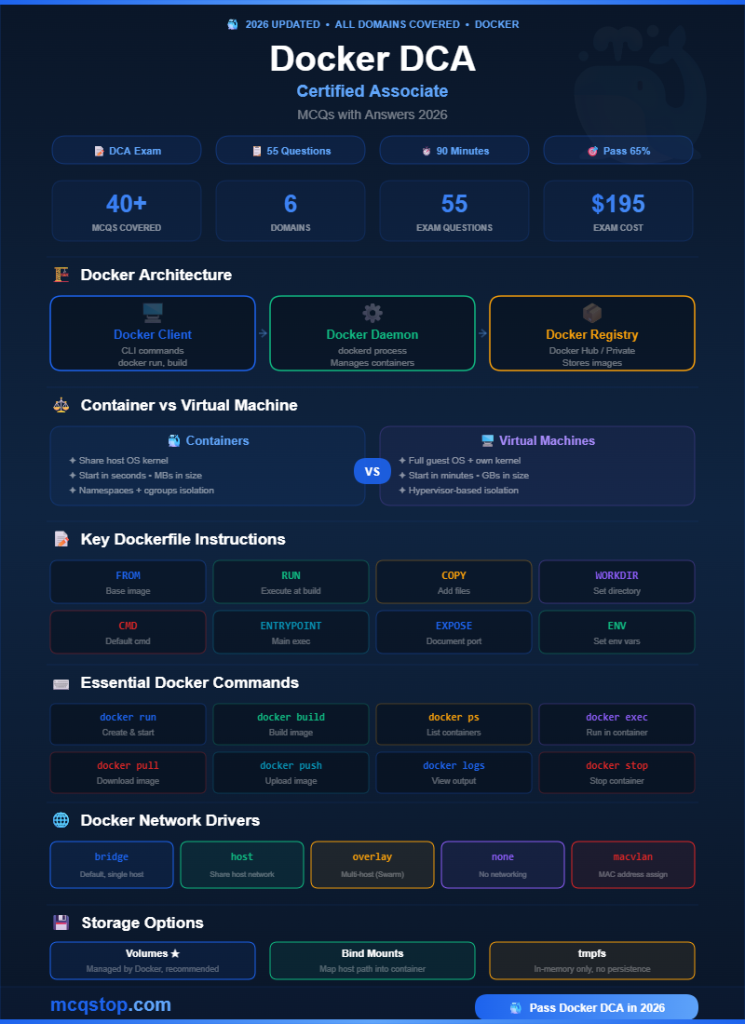
🏗️ Docker Architecture
Talks to Docker daemon
REST API interface
manages containers
Listens for API requests
Private registries
Stores & distributes images
⌨️ Essential Docker Commands
a container
from Dockerfile
containers
running container
from registry
to registry
output logs
container
⚖️ Container vs Virtual Machine
✦ Start in seconds
✦ MBs in size (lightweight)
✦ Process-level isolation
✦ Best for microservices
✦ Start in minutes
✦ GBs in size (heavy)
✦ Hardware-level isolation
✦ Best for full OS workloads
📝 Key Dockerfile Instructions
💡 Docker DCA Exam Tips
🎯 Keep Practicing — More MCQs Available!
We update our question bank regularly to match the latest Docker exam objectives




Leave a Comment