Computer Networking is one of the most important topics in computer science — tested in every competitive exam (NTS, PPSC, FPSC, CSS, GATE, UGC NET), job interview, and university exam. These fully solved MCQs cover the OSI model, TCP/IP protocol suite, IP addressing and subnetting, network devices (routers, switches, hubs), wireless networking, DNS, DHCP, HTTP, FTP, and network security fundamentals. Whether you’re preparing for government exams, IT job interviews, or academic tests — this comprehensive collection has you covered.
How many layers does the OSI (Open Systems Interconnection) model have?
A4 layers
B5 layers
C7 layers ✅
D6 layers
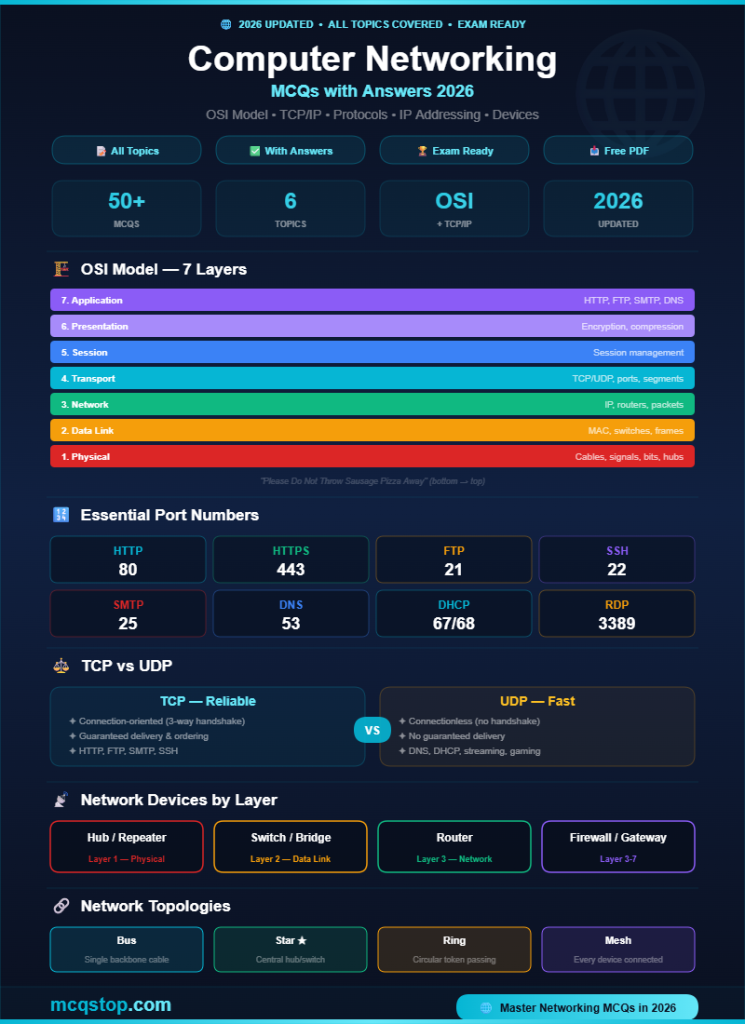
💡 Explanation: The OSI model has 7 layers (bottom to top): (1) Physical — bits, cables, signals. (2) Data Link — frames, MAC addresses, switches. (3) Network — packets, IP addresses, routers. (4) Transport — segments, TCP/UDP, ports. (5) Session — session management. (6) Presentation — encryption, compression, formatting. (7) Application — HTTP, FTP, SMTP, DNS. Memory trick: “Please Do Not Throw Sausage Pizza Away”.
Question 02
Which OSI layer is responsible for routing packets between different networks using IP addresses?
AData Link Layer
BNetwork Layer (Layer 3) ✅
CTransport Layer
DApplication Layer
💡 Explanation: Layer 3 (Network) handles logical addressing (IP addresses) and routing packets between networks. Key protocols: IP (Internet Protocol), ICMP (ping), ARP (IP→MAC translation), IGMP (multicast). The router is the primary Layer 3 device. Layer 2 (Data Link) handles physical addressing (MAC) within a local network using switches. Layer 4 (Transport) handles port-based communication with TCP/UDP.
Question 03
How many layers does the TCP/IP model have, and what are they?
C5 layers — Physical, Data Link, Network, Transport, Application
D3 layers — Physical, Logical, Application
💡 Explanation: TCP/IP has 4 layers: (1) Network Access (combines OSI Physical + Data Link), (2) Internet (= OSI Network — IP, ICMP, ARP), (3) Transport (TCP, UDP), (4) Application (combines OSI Session + Presentation + Application — HTTP, FTP, SMTP, DNS). TCP/IP is the real-world model used on the internet. OSI is the theoretical reference model used for teaching.
Question 04
What is the difference between TCP and UDP?
ATCP is connection-oriented, reliable, and ordered; UDP is connectionless, unreliable, and faster ✅
BUDP is more reliable than TCP
CTCP is used for video streaming; UDP is used for file transfer
DThere is no difference
💡 Explanation:TCP (Transmission Control Protocol): connection-oriented, reliable delivery, error checking, ordered packets, flow control. Uses: web browsing (HTTP), email (SMTP), file transfer (FTP). UDP (User Datagram Protocol): connectionless, no guarantee of delivery, no ordering, faster/lower overhead. Uses: video streaming, online gaming, DNS queries, VoIP. TCP uses a 3-way handshake (SYN → SYN-ACK → ACK) to establish connection.
2
Protocols & Network Services
HTTP, DNS, DHCP, FTP & More
Question 05
Which protocol translates human-readable domain names (like google.com) into IP addresses?
ADNS (Domain Name System) ✅
BDHCP
CHTTP
DARP
💡 Explanation: DNS is the “phonebook of the internet” — it resolves domain names to IP addresses. When you type google.com, DNS returns 142.250.x.x. DNS uses port 53 and typically UDP for queries. DNS hierarchy: Root servers → TLD servers (.com, .org) → Authoritative servers. Types of DNS records: A (IPv4), AAAA (IPv6), CNAME (alias), MX (mail), NS (name server), TXT (text/verification).
Question 06
Which protocol automatically assigns IP addresses, subnet masks, default gateways, and DNS server addresses to devices on a network?
ADHCP (Dynamic Host Configuration Protocol) ✅
BDNS
CNAT
DFTP
💡 Explanation: DHCP automatically assigns network configuration to devices. The DHCP process (DORA): Discover (client broadcasts to find a DHCP server), Offer (server offers an IP), Request (client requests the offered IP), Acknowledge (server confirms). DHCP uses ports 67 (server) and 68 (client). Without DHCP, every device would need manual IP configuration — impractical for large networks.
Question 07
What is the default port number for HTTP and HTTPS?
AHTTP = Port 80, HTTPS = Port 443 ✅
BHTTP = Port 443, HTTPS = Port 80
CHTTP = Port 8080, HTTPS = Port 8443
DHTTP = Port 21, HTTPS = Port 22
💡 Explanation: Essential port numbers to memorize: HTTP = 80, HTTPS = 443, FTP = 20/21, SSH = 22, Telnet = 23, SMTP = 25, DNS = 53, DHCP = 67/68, POP3 = 110, IMAP = 143, SNMP = 161, RDP = 3389. HTTPS adds SSL/TLS encryption to HTTP — it’s the secure version used by all modern websites. Port numbers are one of the most tested networking topics in competitive exams.
3
IP Addressing & Network Devices
IPv4, Subnetting, Routers & Switches
Question 08
An IPv4 address is how many bits long?
A16 bits
B32 bits ✅
C64 bits
D128 bits
💡 Explanation: IPv4 = 32 bits (4 octets) → 4.3 billion addresses (e.g., 192.168.1.1). IPv6 = 128 bits → virtually unlimited addresses (e.g., 2001:0db8:85a3::8a2e:0370:7334). IPv4 classes: Class A (1.0.0.0 – 126.x.x.x, large networks), Class B (128.0.0.0 – 191.x.x.x, medium), Class C (192.0.0.0 – 223.x.x.x, small), Class D (multicast), Class E (experimental). Private IP ranges: 10.x.x.x, 172.16-31.x.x, 192.168.x.x.
Question 09
Which network device operates at Layer 3 (Network Layer) and forwards packets between different networks based on IP addresses?
AHub
BSwitch
CRouter ✅
DBridge
💡 Explanation: Network devices by layer: Hub = Layer 1 (Physical) — broadcasts to all ports, no intelligence. Switch = Layer 2 (Data Link) — forwards frames based on MAC addresses, creates separate collision domains. Router = Layer 3 (Network) — forwards packets between different networks based on IP addresses. Bridge = Layer 2 — connects two network segments. Gateway = Translates between different protocols/networks.
Question 10
What is the purpose of a subnet mask?
ATo divide an IP address into the network portion and the host portion, determining which part identifies the network and which identifies the device ✅
BTo encrypt network traffic
CTo translate domain names to IP addresses
DTo hide the MAC address
💡 Explanation: A subnet mask separates the network portion from the host portion of an IP address. Example: IP 192.168.1.100 with mask 255.255.255.0 (/24) — the network is 192.168.1.0 and the host is .100. Common masks: /8 (255.0.0.0 = Class A), /16 (255.255.0.0 = Class B), /24 (255.255.255.0 = Class C). Subnetting divides a large network into smaller subnets for better organization and security.
4
Network Security & Wireless
Firewalls, Encryption, WiFi
Question 11
Which network security device monitors and filters incoming and outgoing network traffic based on predefined security rules?
AFirewall ✅
BRouter
CHub
DRepeater
💡 Explanation: A firewall acts as a barrier between a trusted internal network and untrusted external networks (internet). Types: Packet filtering (checks headers — IP, port, protocol), Stateful inspection (tracks connection state), Application-level gateway (proxy — inspects application data), Next-generation firewall (deep packet inspection + IPS). Firewalls can be hardware (network-based) or software (host-based like Windows Firewall).
Question 12
Which wireless security protocol is currently the most secure standard for WiFi networks?
AWEP
BWPA
CWPA2
DWPA3 ✅
💡 Explanation: WiFi security evolution (weakest → strongest): WEP (1997, broken — never use), WPA (2003, TKIP encryption, improved but vulnerable), WPA2 (2004, AES encryption, standard for years), WPA3 (2018, SAE handshake, 192-bit encryption, most secure). WPA3 provides better protection against brute-force attacks and is the current recommended standard for all WiFi networks.
Question 13
Which technology creates a secure, encrypted tunnel over the internet — allowing remote users to safely access a private network?
AVPN (Virtual Private Network) ✅
BNAT
CProxy server
DVLAN
💡 Explanation: A VPN encrypts all traffic between the user’s device and the VPN server, creating a secure tunnel over the public internet. Types: Site-to-Site (connects two offices), Remote Access (individual users connect to corporate network). Protocols: IPSec, OpenVPN, WireGuard, L2TP. NAT translates private IPs to public IPs. Proxy servers act as intermediaries. VLANs logically separate traffic within a physical network.
Question 14
Which network topology connects all devices to a single central cable (backbone)?
AStar topology
BBus topology ✅
CRing topology
DMesh topology
💡 Explanation: Network topologies: Bus — all devices on one cable (cheap but single point of failure). Star — all devices connect to a central switch/hub (most common, easy to manage). Ring — devices form a circular chain (token passing). Mesh — every device connects to every other device (most redundant/reliable, expensive). Hybrid — combination of topologies. Star topology is the most widely used in modern LANs.
✦ Connectionless (no handshake) ✦ No guaranteed delivery or ordering ✦ Minimal overhead ✦ Faster but unreliable ✦ Uses: DNS, DHCP, streaming, VoIP
🔗 Network Topologies
📏
Bus
Single backbone cable Cheap, single failure point
⭐
Star
Central hub/switch Most common today
🔄
Ring
Circular chain Token passing
🕸️
Mesh
Every-to-every Most redundant
💡 Networking Study Tips
1
Memorize the OSI Model & Port Numbers
Use the mnemonic “Please Do Not Throw Sausage Pizza Away” for 7 OSI layers. Memorize port numbers for HTTP (80), HTTPS (443), FTP (21), SSH (22), DNS (53), SMTP (25), DHCP (67/68). These appear in every networking exam and interview.
2
Know TCP vs UDP — Most Tested Topic
Understand: TCP = reliable, connection-oriented, 3-way handshake. UDP = fast, connectionless, no guarantees. Know which protocols use TCP (HTTP, FTP, SMTP) vs UDP (DNS queries, streaming, gaming). This distinction appears in 90% of networking assessments.
3
Practice IP Addressing & Subnetting
Know IPv4 classes, private IP ranges, and subnet masks. Practice converting between decimal and binary. Subnetting questions are common in CCNA prep, competitive exams, and job interviews. Start with /24, /16, /8 masks and work toward CIDR notation.
🎯 Practice More Computer Science MCQs!
We cover all computer science topics with fully solved questions
Computer networking MCQs appear in virtually every competitive exam: NTS, PPSC, FPSC, CSS, PMS, GATE, UGC NET, SSC CGL, IBPS, bank exams, and university exams. They’re also heavily tested in IT job interviews for network engineer, system administrator, helpdesk, and DevOps roles. Cisco CCNA certification also tests all these concepts.
What is the most important networking topic?
The OSI model and TCP/IP model are the foundation — learn these first. Then focus on: TCP vs UDP, IP addressing (IPv4 classes, subnetting), port numbers, DNS/DHCP, and network devices (hub vs switch vs router). These topics cover 80% of all networking questions in exams.
Is this PDF free to download?
Yes — all MCQs on mcqstop.com are completely free with full explanations. You can bookmark this page for quick access or save it as a PDF from your browser (File → Print → Save as PDF). We regularly update our question bank with new MCQs.






Leave a Comment