Configuration & Setup
Domain 1 — 20% of Exam
Question 01
A Salesforce admin needs to manage different configurations for users in the Sales and Service departments. Which feature allows the admin to customize the user interface, default settings, and app visibility for different groups of users?
APermission Sets
BProfiles ✅
CRoles
DPublic Groups
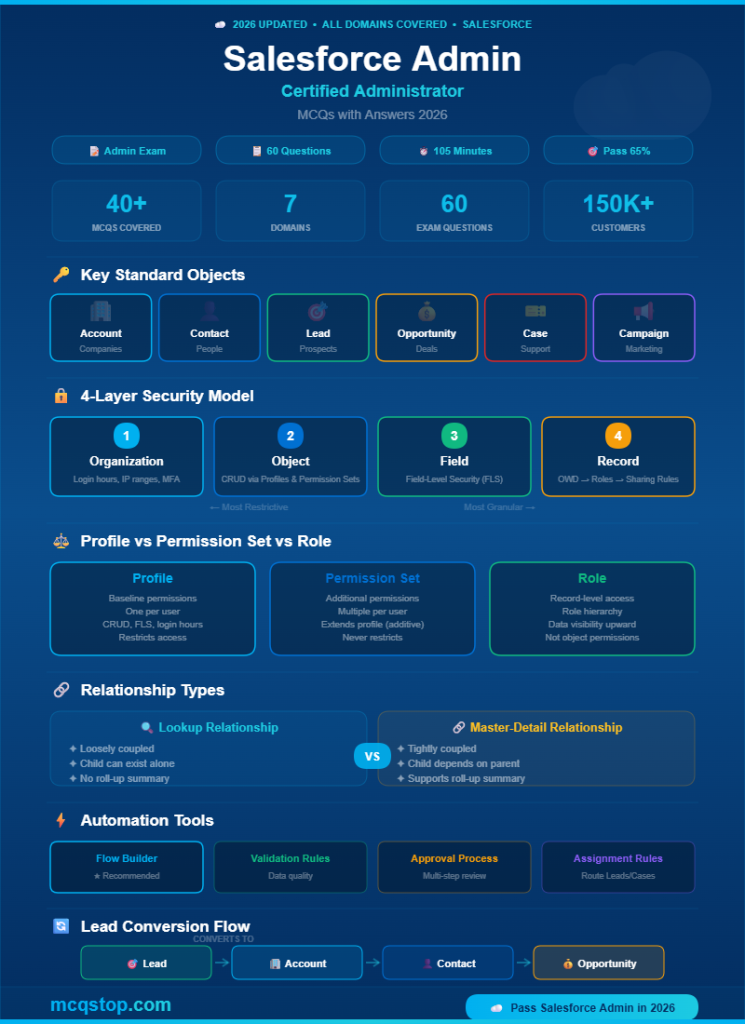
💡 Explanation: Profiles define the baseline permissions, UI settings, login restrictions, and default app visibility for a group of users. Every user must be assigned exactly one profile. Profiles control object CRUD permissions, field-level security, page layouts, login hours/IP ranges, and app visibility. Permission Sets EXTEND profile permissions (additive only). Roles control record-level access (data visibility in the hierarchy). This distinction is the #1 tested concept.
Question 02
An admin wants to give a specific user additional permissions beyond their profile without changing the profile itself. What should the admin use?
APermission Set ✅
BRole
COrganization-Wide Default
DSharing Rule
💡 Explanation: Permission Sets grant additional permissions on top of a user’s profile — they are additive and never restrict. A user can have multiple permission sets but only one profile. Use Permission Set Groups to bundle related permission sets together. Roles control record visibility in the hierarchy. OWDs set the baseline record access. Sharing rules open up access beyond OWDs. Profile + Permission Set is the most tested combination.
Question 03
Which Salesforce feature allows an admin to create a sandbox copy of the production environment for testing and development?
AData Loader
BSandbox ✅
CChange Sets
DDebug Log
💡 Explanation: Sandboxes are isolated copies of your production org for testing, development, and training. Types: Developer (config only, no data), Developer Pro (more storage), Partial Copy (config + sample data), Full Copy (complete copy with all data). Always test changes in a sandbox before deploying to production. Change Sets move customizations between sandboxes and production. Data Loader imports/exports data.
2
Object Manager & Data Modeling
Domain 2 — 20% of Exam
Question 04
What is the relationship type between Account and Contact in Salesforce?
AMany-to-Many
BLookup (One-to-Many) ✅
CMaster-Detail
DSelf-relationship
💡 Explanation: Account-to-Contact is a Lookup relationship — one Account can have many Contacts, but Contacts can exist independently (without an Account). In a Master-Detail relationship, the child record cannot exist without a parent and inherits sharing/security. Lookup = loosely coupled (child can exist alone). Master-Detail = tightly coupled (child depends on parent, cascade delete). Know the differences for every exam question.
Question 05
An admin needs to create a field that automatically calculates the total value of all related Opportunity amounts on an Account. Which field type should they use?
AFormula field
BRoll-Up Summary field ✅
CAuto-number field
DCross-object formula
💡 Explanation: A Roll-Up Summary field aggregates data from child records in a Master-Detail relationship — using COUNT, SUM, MIN, or MAX. It’s created on the parent (master) object. Important: Roll-Up Summary fields ONLY work with Master-Detail relationships, not Lookup. Formula fields calculate values using other fields on the same record. Cross-object formulas can reference parent record fields but can’t aggregate child records.
Question 06
Which standard Salesforce object tracks potential sales deals and revenue?
ALead
BOpportunity ✅
CCase
DCampaign
💡 Explanation: The Opportunity object tracks potential deals through the sales pipeline. Key fields include Stage, Amount, Close Date, and Probability. Opportunities progress through stages (Prospecting → Qualification → Proposal → Negotiation → Closed Won/Lost). Leads are unqualified prospects. Cases track customer support issues. Campaigns track marketing initiatives. Know all standard objects and their relationships.
3
Security & Access
Domain 3 — 13% of Exam
Question 07
In Salesforce’s data access model, what is the correct order of the security layers from most restrictive to most open?
AOrganization → Object → Field → Record ✅
BRecord → Field → Object → Organization
CObject → Organization → Record → Field
DField → Record → Object → Organization
💡 Explanation: Salesforce security has four layers: (1) Organization — login hours, IP restrictions, MFA; (2) Object — CRUD permissions via profiles/permission sets; (3) Field — Field-Level Security (FLS) controls visibility of individual fields; (4) Record — OWDs, role hierarchy, sharing rules, manual sharing control which records a user can see. This layered model is the foundation of Salesforce security and is tested extensively.
Question 08
What determines the baseline level of record access for all users in an organization for each object?
AOrganization-Wide Defaults (OWD) ✅
BRole Hierarchy
CSharing Rules
DProfiles
💡 Explanation: Organization-Wide Defaults (OWD) set the BASELINE record access for each object. Options: Private (only owner + users above in role hierarchy), Public Read Only (all can view, only owner can edit), Public Read/Write (all can view and edit). Start with the most restrictive OWD needed, then OPEN UP access using role hierarchy, sharing rules, and manual sharing. You can only open up — never restrict below OWD.
4
Automation & Analytics
Domain 4 — 22% of Exam
Question 09
Which Salesforce automation tool allows admins to build complex, multi-step business processes with a visual, drag-and-drop interface — replacing Workflow Rules and Process Builder?
AFlow Builder ✅
BWorkflow Rules
CProcess Builder
DValidation Rules
💡 Explanation: Flow Builder is Salesforce’s recommended automation tool — it replaces both Workflow Rules and Process Builder (both being retired). Flow types include: Screen Flows (user-facing forms), Record-Triggered Flows (run when records change), Scheduled Flows (run on a schedule), and Auto-launched Flows (called from other automations). Flow Builder can create records, update records, send emails, call Apex, and make decisions with branching logic.
Question 10
Which automation tool prevents users from saving a record if specific criteria are not met — for example, ensuring a phone number field is not empty when the status is “Active”?
AFlow Builder
BValidation Rule ✅
CApproval Process
DAssignment Rule
💡 Explanation: Validation Rules enforce data quality by preventing users from saving records that don’t meet specific criteria. They use formula expressions that evaluate to TRUE (block save) or FALSE (allow save). Example: AND(ISPICKVAL(Status__c, "Active"), ISBLANK(Phone)) blocks saving when Status is Active but Phone is empty. Validation Rules run BEFORE the record is saved. Flow Builder automates actions AFTER save.
Question 11
A sales manager wants a visual summary showing the total revenue by sales stage. Which Salesforce reporting feature should the admin create?
ATabular report
BList view
CDashboard with a chart component ✅
DData Export
💡 Explanation: Dashboards provide visual summaries of report data using components like charts, gauges, tables, and metrics. Each dashboard component is powered by a source report. Report types: Tabular (simple list), Summary (grouped data with subtotals), Matrix (grouped by rows AND columns), Joined (multiple report blocks). For the visual revenue-by-stage view, create a Summary report grouped by Stage, then add it to a dashboard as a chart.
Question 12
When a Lead is qualified and ready to be converted, what standard objects are created during the Lead Conversion process?
AAccount, Contact, and optionally an Opportunity ✅
BCase and Contact only
CCampaign and Opportunity only
DAccount and Task only
💡 Explanation: Lead Conversion creates an Account (the company), a Contact (the person), and optionally an Opportunity (the deal). The admin can also map to an existing Account to avoid duplicates. Lead data is transferred to the new records and the Lead status changes to “Converted.” Understanding the Lead-to-Opportunity lifecycle is essential for the Salesforce Admin exam.
Question 13
Which feature allows an admin to define a multi-step process where records must be reviewed and approved by specific users before proceeding?
AApproval Process ✅
BEscalation Rule
CAssignment Rule
DRecord Type
💡 Explanation: Approval Processes define a multi-step workflow for approving records. Components include: entry criteria, approval steps, assigned approvers, email alerts, field updates on approval/rejection, and final approval/rejection actions. Example: a discount over 20% requires manager approval. The record is locked during the approval process. Escalation Rules auto-escalate Cases. Assignment Rules route Leads/Cases to queues or users.
Question 14
An admin needs to import 50,000 records into Salesforce. Which tool is BEST suited for this bulk data operation?
AImport Wizard
BData Loader ✅
CMass Transfer
DReports
💡 Explanation: Data Loader is a desktop application for bulk insert, update, upsert, delete, and export of up to 5 million records. It uses the Bulk API for large datasets. The Import Wizard is a web-based tool limited to 50,000 records and only supports Accounts, Contacts, Leads, Solutions, and custom objects. For 50,000+ records or complex operations, always use Data Loader. This is a frequently tested distinction.





Leave a Comment