Operating System (OS) is one of the most important subjects in computer science — tested in every competitive exam (GATE, UGC NET, NTS, PPSC, FPSC, CSS), university exam, and technical interview. An OS manages hardware resources and provides services for application programs. These fully solved MCQs cover process management, CPU scheduling algorithms, memory management (paging, segmentation), deadlocks, file systems, disk scheduling, and types of operating systems. Whether you’re a CS student, preparing for government exams, or heading into IT interviews — this comprehensive collection covers all key OS concepts.
What is the primary function of an operating system?
ATo manage hardware resources and provide an interface between the user and computer hardware ✅
BTo compile programming languages
CTo connect computers to the internet
DTo design websites
💡 Explanation: An operating system is system software that manages CPU, memory, storage, I/O devices, and provides services for application programs. Key functions: Process management (scheduling, creation, termination), Memory management (allocation, paging, swapping), File management (creation, deletion, access control), I/O management (device drivers, buffering), and Security (authentication, access control). Examples: Windows, Linux, macOS, Android, iOS.
Question 02
What is the difference between a process and a thread?
AA process is an independent program in execution with its own memory; a thread is a lightweight unit of execution within a process that shares the process’s memory ✅
BThey are the same thing
CA thread is heavier than a process
DProcesses share memory; threads do not
💡 Explanation: A process has its own address space, code, data, and system resources — it’s an independent entity. A thread (lightweight process) runs within a process and shares the process’s memory, code, and resources — only the stack and registers are separate per thread. Threads are faster to create and switch between (less overhead). Multi-threading enables parallelism within a single application (e.g., a web browser loading multiple tabs).
Question 03
What are the five states in a typical process lifecycle?
💡 Explanation: Process states: New (being created), Ready (waiting for CPU in ready queue), Running (currently executing on CPU), Waiting/Blocked (waiting for I/O or event), Terminated (finished execution). Transitions: New→Ready (admitted), Ready→Running (scheduled by CPU), Running→Waiting (I/O request), Waiting→Ready (I/O complete), Running→Ready (preempted/time quantum expired), Running→Terminated (exit).
Question 04
Which CPU scheduling algorithm allocates the CPU to each process in a circular order for a fixed time slice (time quantum)?
AFirst Come First Serve (FCFS)
BShortest Job First (SJF)
CRound Robin (RR) ✅
DPriority Scheduling
💡 Explanation: CPU scheduling algorithms: FCFS (first come, first served — non-preemptive, simple but suffers from convoy effect). SJF (shortest burst time first — optimal average waiting time but hard to predict). Round Robin (each process gets a fixed time quantum — fair, preemptive, widely used in time-sharing systems). Priority (highest priority first — can cause starvation, solved by aging). RR is most commonly used in modern OS.
2
Memory Management
Paging, Segmentation & Virtual Memory
Question 05
What is virtual memory in an operating system?
AA memory management technique that uses disk space to extend the apparent size of RAM, allowing programs larger than physical memory to execute ✅
BExtra RAM chips installed on the motherboard
CMemory used only by the operating system kernel
DCache memory inside the CPU
💡 Explanation: Virtual memory creates an illusion of a very large main memory by using disk space (swap space/page file). Only the active portions of a program stay in RAM; the rest stays on disk. When a needed page isn’t in RAM, a page fault occurs and the OS loads it from disk. Benefits: run programs larger than physical RAM, memory isolation between processes, and efficient multi-tasking. Implemented through paging (fixed-size pages) or segmentation (variable-size segments).
Question 06
What is the difference between paging and segmentation?
APaging divides memory into fixed-size pages; segmentation divides memory into variable-size logical segments (code, data, stack) ✅
DPaging is used in virtual memory; segmentation is not
💡 Explanation:Paging: divides logical memory into fixed-size pages and physical memory into same-size frames. No external fragmentation but has internal fragmentation. Segmentation: divides memory into variable-size segments based on logical divisions (code, data, stack). No internal fragmentation but has external fragmentation. Modern OS use paged segmentation — combining both techniques. Page replacement algorithms: FIFO, LRU (Least Recently Used), Optimal.
Question 07
Which page replacement algorithm replaces the page that has NOT been used for the longest period of time?
AFIFO (First In First Out)
BLRU (Least Recently Used) ✅
COptimal Page Replacement
DLFU (Least Frequently Used)
💡 Explanation: Page replacement algorithms: FIFO — replaces the oldest page (simple but can suffer Bélády’s anomaly). LRU — replaces the page least recently accessed (good performance, widely used). Optimal — replaces the page that won’t be used for the longest time in the future (theoretical best, impossible to implement in practice). LFU — replaces the least frequently accessed page. LRU is the most commonly used in real-world systems.
3
Deadlocks & Process Synchronization
Deadlock Conditions, Semaphores & Mutex
Question 08
What are the four necessary conditions for a deadlock to occur?
AMutual Exclusion, Hold and Wait, No Preemption, and Circular Wait ✅
💡 Explanation: ALL four conditions must hold simultaneously for deadlock: (1) Mutual Exclusion — at least one resource is non-sharable. (2) Hold and Wait — a process holds a resource and waits for another. (3) No Preemption — resources cannot be forcibly taken. (4) Circular Wait — a circular chain of processes, each waiting for a resource held by the next. Break ANY one condition to prevent deadlock. This is one of the most tested OS concepts in GATE and competitive exams.
Question 09
What is a semaphore in operating systems?
AA synchronization variable (integer) used to control access to shared resources using wait() and signal() operations ✅
BA type of scheduling algorithm
CA memory allocation technique
DA type of interrupt
💡 Explanation: A semaphore is a synchronization tool introduced by Dijkstra. Two types: Binary semaphore (mutex — values 0 or 1, for mutual exclusion). Counting semaphore (values 0 to N, controls access to multiple instances of a resource). Operations: wait(S) / P() — decrement and block if 0. signal(S) / V() — increment and wake a waiting process. Classic problems: Producer-Consumer, Readers-Writers, Dining Philosophers.
Question 10
What is a race condition?
AA situation where the outcome depends on the timing/order of execution of two or more processes accessing shared data simultaneously ✅
BWhen two processes compete for CPU time
CA type of deadlock
DWhen a process runs faster than another
💡 Explanation: A race condition occurs when multiple processes/threads access shared data concurrently and the result depends on execution order. Example: two threads both read balance=100, then both write balance=200 (instead of 300). The critical section is the code that accesses shared resources. Solutions: Mutex (lock/unlock), Semaphores (wait/signal), Monitors (higher-level construct). Requirements: mutual exclusion, progress, and bounded waiting.
4
File Systems & Disk Scheduling
File Allocation, Types & Disk Algorithms
Question 11
Which part of the operating system is loaded first into memory during the boot process and remains in memory permanently?
AKernel ✅
BShell
CBIOS
DDevice drivers
💡 Explanation: The kernel is the core of the OS — it manages CPU, memory, I/O, and processes. It’s loaded into RAM by the bootloader and stays resident permanently. Types: Monolithic kernel (all OS services in kernel space — Linux), Microkernel (minimal kernel, services in user space — Minix, QNX), Hybrid kernel (combination — Windows, macOS). BIOS/UEFI is firmware on the motherboard. Shell is the user interface (CLI/GUI).
Question 12
What is thrashing in an operating system?
AA condition where the system spends more time swapping pages in and out of memory than executing actual processes — severely degrading performance ✅
BWhen the CPU runs at maximum speed
CWhen the hard disk is full
DA type of virus attack
💡 Explanation: Thrashing happens when too many processes compete for too little physical memory. The system spends most of its time handling page faults (swapping pages between RAM and disk) instead of doing useful work. CPU utilization drops dramatically. Solutions: reduce degree of multiprogramming, increase RAM, use working set model, or use page fault frequency to control process allocation. Thrashing is a common GATE and interview question.
Question 13
What is the difference between internal fragmentation and external fragmentation?
AInternal: wasted space INSIDE an allocated block; External: free space exists but is scattered in small non-contiguous blocks ✅
BThey are the same thing
CInternal affects disk; external affects RAM only
DExternal happens inside allocated blocks
💡 Explanation:Internal fragmentation: wasted space inside an allocated memory block (e.g., process needs 3KB but gets a 4KB page — 1KB wasted). Occurs with fixed-size allocation (paging). External fragmentation: enough total free memory exists but it’s not contiguous (e.g., 5 scattered 2KB blocks can’t satisfy a 10KB request). Occurs with variable-size allocation (segmentation). Solution for external: compaction (rearranging memory) or paging.
Question 14
Which type of operating system allows multiple users to access the same computer system simultaneously?
ABatch OS
BMulti-user / Time-sharing OS ✅
CReal-time OS
DEmbedded OS
💡 Explanation: Types of OS: Batch OS — jobs executed in batches without user interaction. Time-sharing/Multi-user — multiple users share CPU time (each gets a time slice). Examples: Unix, Linux. Real-Time OS (RTOS) — strict timing requirements (hard RTOS: medical devices, soft RTOS: multimedia). Distributed OS — manages a group of networked computers as one system. Embedded OS — designed for embedded devices (IoT, routers).
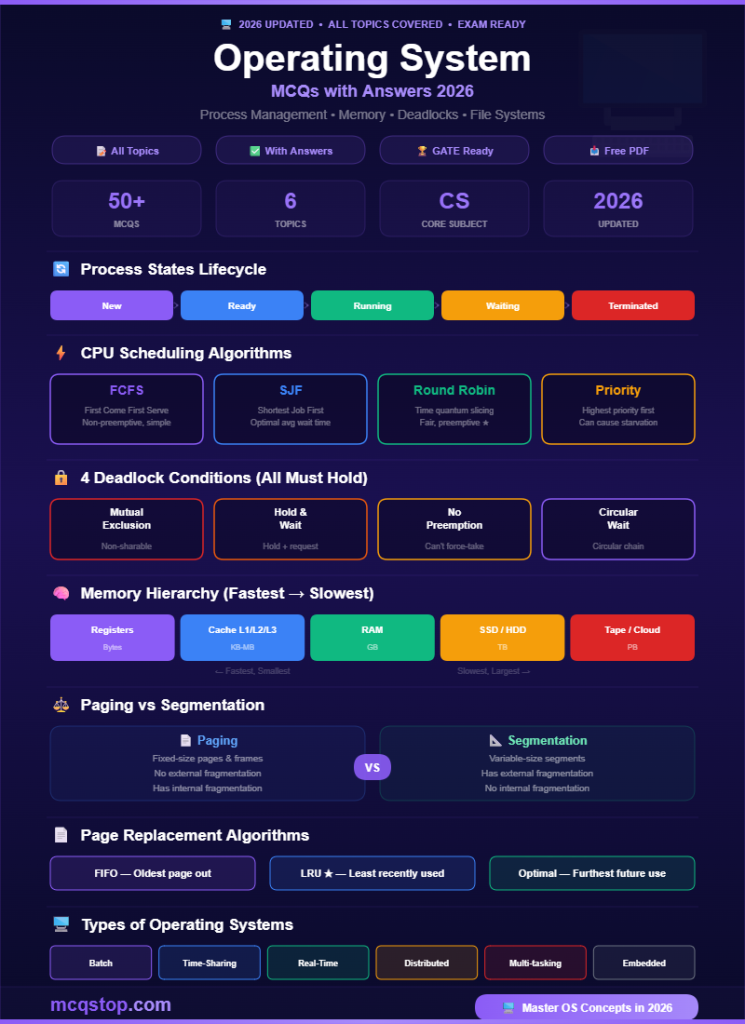
Process States Lifecycle
🆕 New
→
⏳ Ready
→
▶️ Running
→
⏸️ Waiting
→
🏁 Terminated
CPU Scheduling Algorithms
FCFS
First Come First Serve Non-preemptive, simple
SJF
Shortest Job First Optimal avg wait time
Round Robin
Time quantum slicing Fair, preemptive ★
Priority
Highest priority first Can cause starvation
4 Deadlock Conditions (All Must Hold)
Mutual Exclusion
Resource non-sharable
Hold & Wait
Hold one, wait another
No Preemption
Can’t forcibly take
Circular Wait
Circular dependency
Memory Hierarchy (Fastest → Slowest)
CPU Registers
Fastest, smallest (bytes)
Cache (L1, L2, L3)
Very fast, small (KB-MB)
RAM (Main Memory)
Fast, moderate (GB)
SSD / Hard Disk
Slow, large (TB)
Tape / Cloud
Slowest, largest (PB)
Paging vs Segmentation
📄 Paging
✦ Fixed-size pages & frames ✦ No external fragmentation ✦ Has internal fragmentation ✦ Physical view of memory ✦ Simpler hardware support
📐 Segmentation
✦ Variable-size segments ✦ Has external fragmentation ✦ No internal fragmentation ✦ Logical view of memory ✦ User-friendly (code, data, stack)
Types of Operating Systems
Batch OS
Jobs in batches, no interaction
Time-Sharing
Multi-user, CPU time slicing
Real-Time (RTOS)
Strict timing, embedded
Distributed OS
Networked computers as one
Multi-tasking
Run multiple programs
Embedded OS
IoT, routers, appliances
OS Study Tips
1
Master Deadlock Conditions & Scheduling
Know the 4 deadlock conditions (Mutual Exclusion, Hold & Wait, No Preemption, Circular Wait) cold. Know all CPU scheduling algorithms (FCFS, SJF, Round Robin, Priority) and be able to calculate waiting time and turnaround time. These are the most tested OS topics.
2
Understand Virtual Memory & Page Replacement
Know the difference between paging and segmentation, internal vs external fragmentation, and page replacement algorithms (FIFO, LRU, Optimal). Practice solving page fault questions — they appear in every GATE exam and university final.
3
Know Process vs Thread & Synchronization
Process vs thread differences are asked in every interview. Understand race conditions, critical sections, semaphores (binary and counting), mutex, and classic synchronization problems (Producer-Consumer, Dining Philosophers, Readers-Writers).
Practice More Computer Science MCQs!
We cover all computer science topics with fully solved questions
Operating System MCQs appear in GATE (CS/IT), UGC NET Computer Science, NTS, PPSC, FPSC, CSS, university exams (B.Tech, BCA, MCA, M.Tech), and technical interviews for software engineer, system administrator, and DevOps roles. OS is one of the four core CS subjects (along with Data Structures, DBMS, and Networking).
What is the most important OS topic for exams?
CPU scheduling algorithms, deadlocks (4 conditions), virtual memory (paging/segmentation), and process synchronization (semaphores, mutex) are the most frequently tested topics. Together they cover 70-80% of all OS questions in competitive exams and interviews.
Is this free to download?
Yes — all MCQs on mcqstop.com are completely free with full explanations. Bookmark this page or save as PDF (File → Print → Save as PDF). We update our question bank regularly with new MCQs covering all computer science topics.






Leave a Comment