IaC Concepts & Terraform Purpose
Domains 1-2 — Fundamentals
Question 01
What is Infrastructure as Code (IaC)?
AManually configuring servers through a web console
BManaging and provisioning infrastructure through machine-readable definition files rather than manual processes ✅
CWriting application code that runs on cloud servers
DA CI/CD pipeline for deploying applications
💡 Explanation: Infrastructure as Code (IaC) is the practice of managing infrastructure (servers, networks, databases) using code files that can be versioned, reviewed, and automated — just like application code. Benefits include: consistency (no configuration drift), repeatability, version control, automation, and self-documenting infrastructure. Terraform is the most popular IaC tool, using HashiCorp Configuration Language (HCL).
Question 02
Terraform uses a declarative approach to defining infrastructure. What does “declarative” mean in this context?
AYou define the desired end state, and Terraform figures out how to achieve it ✅
BYou write step-by-step instructions for each action Terraform should take
CTerraform executes commands in a specific order defined by the user
DYou must specify every API call Terraform should make
💡 Explanation: Declarative means you describe WHAT you want (desired state), not HOW to get there. You define “I want 3 EC2 instances” and Terraform determines the steps needed to reach that state — whether that means creating 3 new instances, or creating 1 more if 2 already exist. Imperative (option B) requires step-by-step instructions. Terraform’s declarative model with state tracking is a core exam concept.
Question 03
Which of the following is a key advantage of Terraform over cloud-specific IaC tools like AWS CloudFormation?
ATerraform can only manage AWS resources
BTerraform is cloud-agnostic and supports 3,000+ providers across multiple clouds and services ✅
CTerraform doesn’t require any configuration files
DTerraform automatically writes code for you
💡 Explanation: Terraform’s biggest advantage is being cloud-agnostic — it works with AWS, Azure, GCP, Kubernetes, GitHub, Datadog, and 3,000+ providers using a single language (HCL). CloudFormation only works with AWS, ARM templates only with Azure. This makes Terraform ideal for multi-cloud strategies. Providers are plugins that enable Terraform to interact with APIs of different platforms.
2
Terraform CLI & Core Workflow
Domains 3-4 — Commands & Workflow
Question 04
What is the correct order of the core Terraform workflow?
AApply → Plan → Init
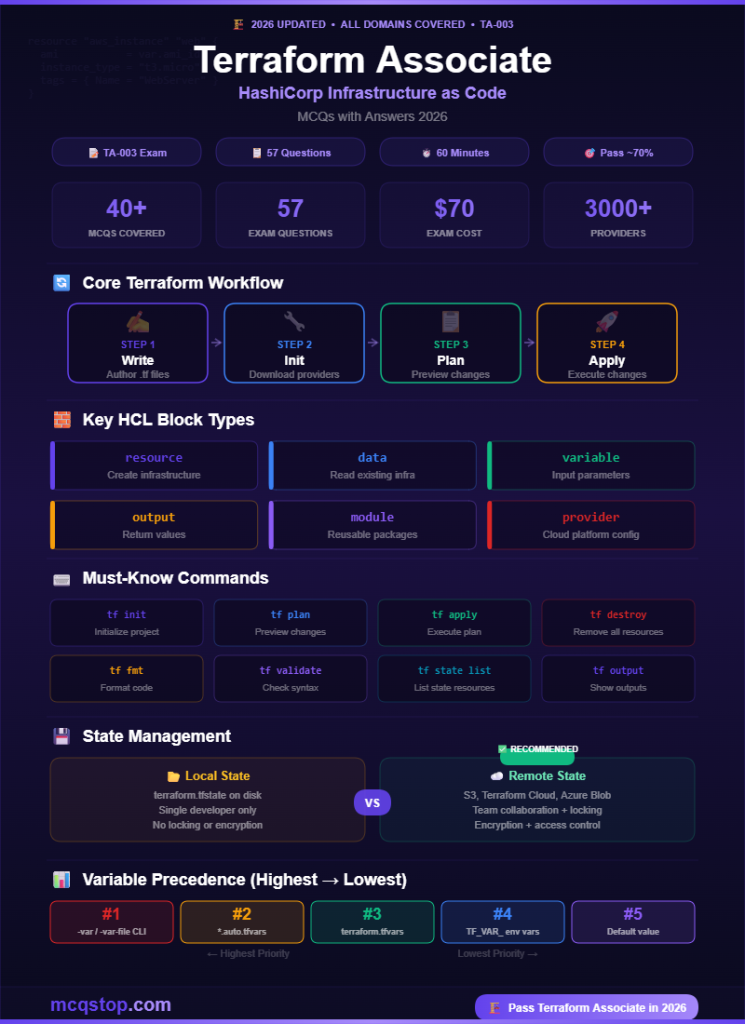
BWrite → Init → Plan → Apply ✅
CPlan → Write → Apply → Init
DInit → Apply → Plan → Destroy
💡 Explanation: The Terraform core workflow: (1) Write — author your .tf configuration files; (2) Init — terraform init downloads providers and initializes the backend; (3) Plan — terraform plan previews changes without applying; (4) Apply — terraform apply executes the plan and creates/modifies resources. Optional: terraform destroy removes all managed resources. This workflow is the most tested concept.
Question 05
What does terraform init do?
ACreates cloud resources
BInitializes the working directory, downloads providers, and configures the backend ✅
CShows a preview of planned changes
DDestroys all managed infrastructure
💡 Explanation: terraform init is the first command you run in any Terraform project. It: downloads required provider plugins (AWS, Azure, etc.), initializes the state backend (local or remote like S3/Terraform Cloud), downloads referenced modules, and creates the .terraform directory. It must be re-run when providers, modules, or backend configuration change. It is safe to run multiple times (idempotent).
Question 06
What does terraform plan do?
ACreates an execution plan showing what Terraform will do without making any changes ✅
BApplies changes to the infrastructure immediately
CDeletes all resources in the state file
DValidates the syntax of configuration files
💡 Explanation: terraform plan compares the desired state (your .tf files) with the current state (terraform.tfstate) and generates an execution plan showing what will be created (+), changed (~), or destroyed (-). It does NOT modify any infrastructure — it’s a dry run. This is essential for reviewing changes before applying. You can save a plan with -out=planfile and apply it later with terraform apply planfile.
3
HCL & Configuration
Domains 5-7 — Variables, Outputs, Resources
Question 07
In Terraform HCL, which block type is used to define a piece of infrastructure such as an EC2 instance or an S3 bucket?
Avariable
Bresource ✅
Coutput
Dprovider
💡 Explanation: The resource block is the most important block in Terraform — it defines an infrastructure object. Syntax: resource "aws_instance" "web" { ... }. The first label is the resource type (from the provider), the second is the local name. variable accepts input, output returns values, provider configures the cloud platform. data sources read existing infrastructure.
Question 08
Which Terraform block is used to read information about existing infrastructure that was NOT created by the current Terraform configuration?
Aresource
Bdata ✅
Cmodule
Dlocals
💡 Explanation: A data source (data block) allows Terraform to query and use information from existing infrastructure not managed by the current config. Example: data "aws_ami" "latest" { ... } fetches the latest AMI ID. Data sources are read-only — they don’t create or modify resources. resource creates new infrastructure, module encapsulates reusable config, and locals define computed values.
Question 09
What is the order of precedence (highest to lowest) for variable values in Terraform?
ADefault value → Environment variable → .tfvars → CLI -var flag
BCLI -var flag → .auto.tfvars → terraform.tfvars → Environment variable → Default ✅
CEnvironment variable → CLI flag → Default → .tfvars
DAll sources have equal precedence
💡 Explanation: Terraform variable precedence (highest wins): (1) -var and -var-file CLI flags, (2) *.auto.tfvars files (alphabetical), (3) terraform.tfvars, (4) TF_VAR_ environment variables, (5) variable default values. If no value is found and no default is set, Terraform prompts for input. This precedence order is a commonly tested exam topic.
Question 10
How do you mark a Terraform variable as sensitive so its value is redacted from CLI output and logs?
ASet sensitive = true in the variable block ✅
BPrefix the variable name with “secret_”
CStore it in a separate encrypted file
DUse the -hide CLI flag
💡 Explanation: Adding sensitive = true to a variable block tells Terraform to redact the value in plan/apply output and logs. Example: variable "db_password" { type = string; sensitive = true }. Note: the value is still stored in the state file in plaintext — so encrypt your state file and use remote backends. Sensitive values also propagate to outputs that reference them.
4
State Management & Modules
Domains 8-9 — State, Backends, Modules
Question 11
What is the purpose of the Terraform state file (terraform.tfstate)?
AStores the Terraform configuration files
BMaps real-world resources to your configuration and tracks metadata ✅
CContains the downloaded provider plugins
DLogs all previous Terraform commands
💡 Explanation: The state file is Terraform’s source of truth — it maps resources in your config to real-world objects. Without state, Terraform wouldn’t know what already exists. It stores resource IDs, attributes, dependencies, and metadata. State can be stored locally (default) or remotely (S3, Terraform Cloud, Azure Blob). Remote state enables team collaboration with state locking to prevent conflicts.
Question 12
Why should the Terraform state file be stored in a remote backend for team environments?
ATo make Terraform run faster
BTo enable shared access, state locking, and prevent concurrent modifications ✅
CBecause local state files are automatically deleted
DRemote backends are the only option Terraform supports
💡 Explanation: Remote backends (S3+DynamoDB, Terraform Cloud, Azure Blob, GCS) provide three critical benefits: (1) Shared state — all team members access the same state; (2) State locking — prevents two people from running apply simultaneously; (3) Encryption — protects sensitive data in state. Without remote state, each person has a local copy, leading to conflicts and drift. This is one of the most tested concepts.
Question 13
What is a Terraform module?
AA reusable, self-contained package of Terraform configuration files ✅
BA Terraform CLI plugin
CA backup of the state file
DA Terraform Cloud workspace
💡 Explanation: A module is a container for multiple Terraform resources used together — think of it as a reusable “building block.” The root module is the main working directory. Child modules can be sourced from local paths, the Terraform Registry, GitHub, or S3. Modules promote DRY (Don’t Repeat Yourself) principles and enable standardization across teams. The Terraform Registry has thousands of pre-built community modules.
Question 14
What does the terraform fmt command do?
AValidates configuration syntax
BAutomatically formats .tf files to a canonical style ✅
CCreates a new Terraform project
DCompresses configuration files
💡 Explanation: terraform fmt rewrites .tf files to follow HashiCorp’s canonical formatting style — consistent indentation, alignment, and spacing. It ensures code readability and consistency across teams. terraform validate checks syntax and internal consistency (different command). terraform fmt -check returns a non-zero exit code if formatting changes are needed — useful in CI/CD pipelines.





Leave a Comment