Core 1 — Mobile Devices, Hardware & Components
CPUs, RAM, storage, motherboards, peripherals, and display types
Question 01
What type of RAM is currently the most common in modern desktop computers?
ASDRAM
BDDR3
CDDR4 / DDR5 ✅
DRDRAM
💡 ExplanationDDR4 has been the dominant desktop RAM standard for several years and DDR5 is rapidly becoming mainstream in 2026. DDR stands for Double Data Rate — each generation offers faster speeds and lower power consumption than the previous. DDR4 and DDR5 modules are physically incompatible and cannot be swapped between motherboards.
Question 02
What is the main advantage of an NVMe SSD over a SATA SSD?
ANVMe SSDs are significantly cheaper than SATA SSDs
BNVMe uses the PCIe interface and is dramatically faster — reaching speeds of 3,500+ MB/s versus SATA’s 600 MB/s limit ✅
CNVMe SSDs use less power making them better for laptops
DNVMe SSDs are compatible with older motherboards without any adapter
💡 ExplanationNVMe (Non-Volatile Memory Express) connects directly to the CPU via the PCIe bus — bypassing the SATA controller bottleneck entirely. This gives read/write speeds 5-7x faster than SATA SSDs. NVMe drives use the M.2 form factor and are standard in all modern laptops and desktops.
Question 03
What does the CPU socket type determine on a motherboard?
AHow many USB ports can be connected to the motherboard
BWhich specific CPU models are physically compatible with that motherboard ✅
CThe maximum amount of RAM the system can support
DThe speed at which the CPU can access storage devices
💡 ExplanationCPU sockets define pin layout and compatibility. Intel uses LGA sockets (e.g. LGA1700) where pins are on the motherboard. AMD uses AM5 where pins are on the CPU. You cannot install an Intel CPU into an AMD socket or vice versa — socket compatibility is the first thing to check when upgrading a processor.
Question 04
What is the purpose of thermal paste when installing a CPU cooler?
ATo permanently bond the cooler to the CPU so it does not fall off
BTo fill microscopic air gaps between the CPU and cooler — maximizing thermal conductivity and heat transfer away from the processor ✅
CTo electrically insulate the CPU from the metal heat sink
DTo lubricate the CPU fan so it spins more quietly
💡 ExplanationBoth the CPU die and cooler base look flat but have microscopic imperfections that trap air — a poor thermal conductor. Thermal paste fills these gaps ensuring maximum direct contact between the surfaces. Without it CPUs can overheat and throttle performance or suffer permanent damage.
🌐
Core 1 — Networking & Cloud Concepts
TCP/IP, DNS, DHCP, ports, protocols, and cloud computing basics
Question 05
What does DHCP do on a network?
ATranslates domain names like google.com into IP addresses
BAutomatically assigns IP addresses, subnet masks, default gateways, and DNS server addresses to devices on a network ✅
CEncrypts all data transmitted between network devices
DFilters incoming network traffic based on port numbers
💡 ExplanationDHCP (Dynamic Host Configuration Protocol) runs on your router or a dedicated server. When a device connects to the network it sends a DHCP Discover broadcast — the server responds with an IP lease. Without DHCP you would have to manually configure IP addresses on every device — impractical in any organization.
Question 06
Which port number does HTTPS use?
APort 21
BPort 80
CPort 443 ✅
DPort 22
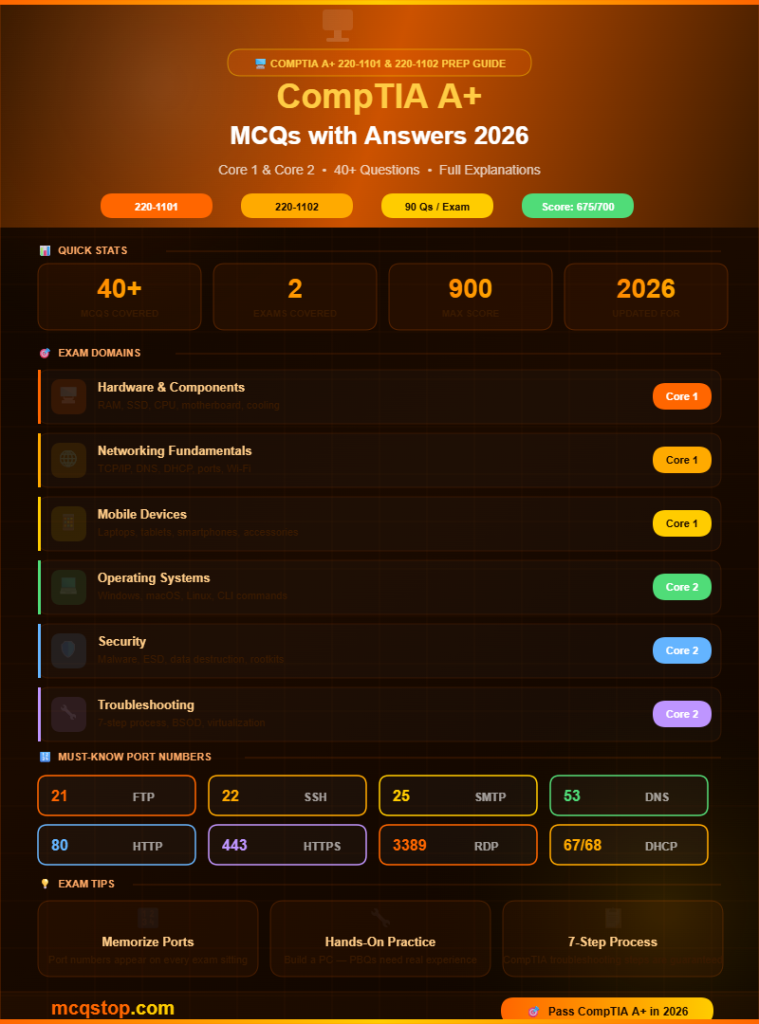
💡 ExplanationKey port numbers for A+ exam: HTTP=80, HTTPS=443, FTP=20/21, SSH=22, Telnet=23, SMTP=25, DNS=53, DHCP=67/68, POP3=110, IMAP=143, RDP=3389, SMB=445. Memorizing these is essential — they appear on almost every A+ exam sitting.
Question 07
What is the difference between a public IP address and a private IP address?
AA public IP is routable on the internet and assigned by ISPs while private IPs are used inside local networks and cannot be routed on the public internet ✅
BPublic IPs are faster than private IPs for local communication
CPrivate IPs are assigned by internet service providers
DPublic and private IP addresses have identical ranges and usage
💡 ExplanationPrivate IP ranges: 10.0.0.0–10.255.255.255, 172.16.0.0–172.31.255.255, and 192.168.0.0–192.168.255.255. Your home router’s local IPs (like 192.168.1.x) are private. Your ISP assigns one public IP to your router which NAT uses to share internet access among all local devices.
💻
Core 2 — Operating Systems
Windows, macOS, Linux, command line, virtualization, and OS features
Question 08
What Windows command displays the IP configuration of a computer?
Anetstat
Bping
Cipconfig ✅
Dtracert
💡 ExplanationEssential Windows CLI commands: ipconfig (IP info), ping (test connectivity), tracert (trace route), netstat (active connections), nslookup (DNS lookup), sfc /scannow (system file check), chkdsk (disk check). The Linux/macOS equivalent of ipconfig is ifconfig or ip addr.
Question 09
What is the Windows Registry?
AA list of all registered software licenses on a Windows computer
BA hierarchical database that stores low-level configuration settings for Windows and installed applications and hardware ✅
CA Windows tool for registering new hardware devices automatically
DA security log file that records all user login attempts on Windows
💡 ExplanationThe Registry is edited using regedit.exe. It contains five main hives: HKEY_LOCAL_MACHINE (hardware and software settings), HKEY_CURRENT_USER (user-specific settings), HKEY_CLASSES_ROOT (file associations), HKEY_USERS, and HKEY_CURRENT_CONFIG. Always back up the Registry before making changes.
🛡️
Core 2 — Security
Malware, social engineering, physical security, data destruction, and best practices
Question 10
What is a rootkit and why is it particularly dangerous?
AMalware that displays unwanted advertisements in a browser
BA type of malware designed to hide its presence and other malicious processes by modifying the OS at a deep level — making it extremely difficult to detect and remove ✅
CSoftware that replicates itself across a network by exploiting vulnerabilities
DA program that secretly logs every keystroke typed on a keyboard
💡 ExplanationRootkits operate at the kernel or firmware level — intercepting OS calls to hide files, processes, and registry entries from antivirus tools. Removing a rootkit often requires booting from external media and scanning outside the infected OS. In severe cases a full OS reinstall is necessary.
Question 11
What is the most secure method to permanently destroy data on a hard drive before disposal?
ADeleting all files and emptying the Recycle Bin
BFormatting the drive using the standard Windows format tool
CPhysical destruction (shredding or drilling) or degaussing for HDDs — making data physically unrecoverable ✅
DReinstalling the operating system over the existing data
💡 ExplanationData sanitization methods: Low-level overwrite (writing zeros multiple times), Degaussing (magnetic field for HDDs only), and Physical destruction (shredding, drilling, incineration). For SSDs degaussing does not work — physical destruction or cryptographic erase is required. Simple formatting only removes the file index and data remains recoverable.
🔧
Core 2 — Troubleshooting & Operational Procedures
Troubleshooting methodology, BSOD, printer issues, and best practices
Question 12
What is the correct order of CompTIA’s troubleshooting methodology?
AFix → Test → Document → Identify → Theory
BIdentify the problem → Establish a theory → Test the theory → Establish an action plan → Implement the solution → Verify → Document ✅
CDocument → Identify → Fix → Test → Verify → Theory
DTheory → Test → Identify → Plan → Implement → Document
💡 ExplanationCompTIA’s 7-step process: 1) Identify the problem (gather info, question users), 2) Establish a theory of probable cause, 3) Test the theory, 4) Establish an action plan, 5) Implement the solution, 6) Verify full system functionality, 7) Document findings and lessons learned. This appears on virtually every A+ exam.
Question 13
A user reports their Windows PC shows a BSOD (Blue Screen of Death) on every startup. What is the most likely first step to diagnose this?
AImmediately replace the hard drive with a new one
BBoot into Safe Mode or the Windows Recovery Environment to check the stop error code and event logs for the root cause ✅
CReinstall Windows without investigating the cause first
DTell the user to purchase a new computer immediately
💡 ExplanationBSODs display a stop error code (e.g. IRQL_NOT_LESS_OR_EQUAL, PAGE_FAULT_IN_NONPAGED_AREA). These codes guide diagnosis. Common BSOD causes: faulty RAM, corrupt drivers, failing hard drive, overheating, or bad Windows updates. Safe Mode loads minimal drivers making it easier to isolate the problem.
Question 14
What does ESD stand for and why is it important when working on computer components?
AExternal Storage Device — a portable hard drive used for backups
BElectrostatic Discharge — the sudden transfer of static electricity that can permanently damage sensitive electronic components ✅
CExtended System Display — a type of monitor connection standard
DEmergency Shutdown Directive — a safety protocol for power outages
💡 ExplanationESD can destroy components without you feeling or seeing it. Always use an antistatic wrist strap connected to ground, work on antistatic mats, and keep components in their antistatic bags until needed. Touch a metal part of the case before handling components to discharge any built-up static electricity.
Question 15
What is virtualization in the context of IT support?
ACreating a 3D virtual reality environment for training IT staff
BRunning multiple operating systems simultaneously on one physical machine using a hypervisor — each in its own isolated virtual machine ✅
CConnecting to a remote computer using Remote Desktop Protocol
DStoring files in the cloud instead of on local physical storage
💡 ExplanationA hypervisor (Type 1 like VMware ESXi or Type 2 like VirtualBox) creates and manages virtual machines. Virtualization maximizes hardware utilization, enables easy testing and development environments, simplifies disaster recovery, and is the foundation of cloud computing infrastructure.
Question 16
What is the 3-2-1 backup rule?
ABack up data 3 times per day, 2 times per week, and 1 time per month
BKeep 3 copies of data on 2 different storage media with 1 copy stored offsite ✅
CUse 3 cloud providers, 2 external drives, and 1 internal backup
DTest backups 3 times, store 2 copies, delete 1 old backup weekly
💡 ExplanationThe 3-2-1 rule is the industry gold standard for data protection. Example: Original data on your PC (1), copy on an external hard drive (2 = different media), copy on cloud storage (3 = offsite). This protects against hardware failure, theft, fire, flood, and ransomware attacks simultaneously.
How hard is the CompTIA A+ exam? The A+ is considered beginner to intermediate difficulty. It is broader than many expect covering hardware, software, networking, security, and cloud concepts across two separate exams. Most candidates spend 2 to 4 months preparing using study guides, video courses, and hands-on practice. The performance-based questions (PBQs) require practical knowledge not just memorization.
How many questions are in the CompTIA A+ exam? Each A+ exam (Core 1 and Core 2) contains a maximum of 90 questions including multiple-choice, drag-and-drop, and performance-based questions. You have 90 minutes per exam. A passing score of 675 out of 900 (Core 1) and 700 out of 900 (Core 2) is required.
How much does the CompTIA A+ exam cost? Each CompTIA A+ exam costs approximately USD 239 — meaning the full certification requires two exam fees totaling around $478. CompTIA regularly offers discounts through academic partners, exam bundles, and retake guarantee packages. Check CompTIA’s website for current promotions before booking.
What jobs can the CompTIA A+ certification help me get? CompTIA A+ opens doors to entry-level IT roles including IT Support Specialist, Help Desk Technician, Desktop Support Analyst, Field Service Technician, and Junior Systems Administrator. It is also a prerequisite for many higher-level certifications including CompTIA Network+, Security+, and various vendor-specific certifications.





Leave a Comment