

Which command displays the contents of a file one screen at a time, allowing both forward and backward navigation?
catmoreless ✅headless command displays file contents one page at a time with both forward and backward scrolling using arrow keys, Page Up/Down, and search with /pattern. more only scrolls forward. cat dumps the entire file at once (no paging). head shows only the first 10 lines by default. Remember: “less is more” — less has more features than more.A Linux administrator needs to install a package from a .deb file on an Ubuntu system. Which command should be used?
rpm -i package.debdpkg -i package.deb ✅yum install package.debpacman -S package.debdpkg -i installs .deb packages on Debian-based systems (Ubuntu, Debian). rpm is for Red Hat-based systems (.rpm files). yum and dnf are high-level package managers for RHEL/CentOS/Fedora. pacman is for Arch Linux. For the exam, know the package management hierarchy: dpkg/rpm (low-level) vs apt/yum/dnf (high-level with dependency resolution).Which directory contains the system service unit files used by systemd to manage services?
/etc/init.d//usr/lib/systemd/system/ ✅/var/log//boot/grub//usr/lib/systemd/system/ (vendor defaults) and /etc/systemd/system/ (admin overrides). Key commands: systemctl start/stop/restart/enable/disable servicename. The /etc/init.d/ directory is legacy SysVinit. /var/log/ contains log files, and /boot/grub/ stores the GRUB bootloader config. Systemd is heavily tested on Linux+.Which command is used to change the ownership of a file to a different user and group simultaneously?
chmod user:group filechown user:group file ✅chgrp user:group fileusermod user:group filechown user:group filename changes both the owner and group of a file. Use -R for recursive changes on directories. chmod changes permissions (not ownership). chgrp changes only the group. usermod modifies user account properties. Remember: chown = change owner, chmod = change mode (permissions), chgrp = change group.Security
Domain 2 — 21% of Exam
Which Linux file contains the hashed passwords for user accounts on modern systems?
/etc/passwd/etc/shadow ✅/etc/group/etc/security/etc/shadow stores hashed passwords and is readable only by root (permissions 640). /etc/passwd contains user account info (UID, GID, home directory, shell) but no longer stores passwords — it shows an “x” placeholder. /etc/group stores group memberships. This separation improves security by restricting access to password hashes.A system administrator wants to configure the firewall to allow incoming SSH (port 22) traffic on a RHEL-based system using firewalld. Which command should be used?
iptables -A INPUT -p tcp --dport 22 -j ACCEPTfirewall-cmd --permanent --add-service=ssh ✅ufw allow sshsemanage port -a -t ssh_port_t -p tcp 22firewall-cmd is the command-line tool for firewalld, the default firewall on RHEL/CentOS/Fedora. The --permanent flag makes the rule persist across reboots (followed by --reload). iptables is the legacy firewall tool. ufw (Uncomplicated Firewall) is used on Ubuntu/Debian. semanage manages SELinux contexts. Know all three firewall tools for Linux+.Which Linux security framework provides mandatory access control (MAC) by labeling files, processes, and ports with security contexts?
getenforce or sestatus. AppArmor is an alternative MAC (used by Ubuntu) that uses path-based profiles instead of labels. PAM handles authentication, and TCP Wrappers control host-based access.Scripting & Automation
Domain 3 — 19% of Exam
What is the correct first line (shebang) that should be placed at the top of a Bash shell script to ensure it runs with the Bash interpreter?
#!/bin/bash ✅#/bin/bash!#/bin/bash##/bin/bash#!/bin/bash tells the system to use the Bash shell interpreter to execute the script. The #! must be the very first two characters of the file. Other common shebangs: #!/bin/sh (POSIX shell), #!/usr/bin/python3 (Python), #!/usr/bin/env bash (portable Bash). After adding the shebang, make the script executable with chmod +x script.sh.A system administrator needs to schedule a backup script to run every day at 2:30 AM. Which crontab entry is correct?
30 2 * * * /opt/backup.sh ✅2 30 * * * /opt/backup.sh* 2:30 * * * /opt/backup.sh0 2 30 * * /opt/backup.shminute hour day-of-month month day-of-week command. So 30 2 * * * means minute 30, hour 2 (2:30 AM), every day, every month, every day of the week. Edit crontab with crontab -e, list with crontab -l. The asterisk (*) means “every.” This is one of the most tested topics on Linux+ — memorize the field order!Which command searches for the word “error” in all .log files within /var/log/ recursively?
find /var/log -name "error"grep -r "error" /var/log/*.log ✅locate error /var/logsed 's/error//' /var/log/*.loggrep -r "error" searches for the pattern “error” recursively (-r) through all matching files. Common grep flags: -i (case-insensitive), -r (recursive), -n (show line numbers), -v (invert match), -c (count matches). find searches for filenames, locate uses an index database for filenames, and sed is a stream editor for text transformation.Troubleshooting
Domain 4 — 28% of Exam
A server is running out of disk space. Which command shows disk usage by filesystem, including the percentage of space used?
df -h ✅du -sh /free -hlsblkdf -h (disk free, human-readable) shows filesystem usage including total size, used space, available space, and percentage used for each mounted filesystem. du -sh shows disk usage for specific directories. free -h shows RAM and swap usage. lsblk lists block devices. Remember: df = filesystem overview, du = directory-level detail.A process is consuming 100% CPU and the system is unresponsive. Which command can be used to find the offending process and its PID?
top ✅ifconfignetstatmounttop provides a real-time, dynamic view of running processes sorted by CPU usage by default. It shows PID, user, CPU%, MEM%, and command. Press k to kill a process, M to sort by memory. htop is a more user-friendly alternative. ifconfig shows network interfaces, netstat shows network connections, and mount shows mounted filesystems. Also know ps aux for static process listing.After making changes to the network configuration file, a system administrator needs to restart the networking service. Which systemctl command should be used?
systemctl stop NetworkManagersystemctl restart NetworkManager ✅systemctl enable NetworkManagersystemctl reload NetworkManagersystemctl restart stops and restarts a service — applying configuration changes. Key systemctl verbs: start (start now), stop (stop now), restart (stop+start), reload (re-read config without stopping), enable (start on boot), disable (don’t start on boot), status (check state). enable doesn’t start the service immediately — it only affects boot behavior.Which command displays the kernel ring buffer messages, useful for troubleshooting hardware and boot issues?
dmesg ✅journalctlsysloguptimedmesg displays the kernel ring buffer — messages from the kernel about hardware detection, driver loading, and boot processes. Useful for diagnosing USB, disk, and network hardware issues. Use dmesg | tail to see the latest messages. journalctl queries the systemd journal (all logs), syslog is the traditional logging daemon, and uptime shows how long the system has been running.⌨️ Essential Linux Commands Quick Reference
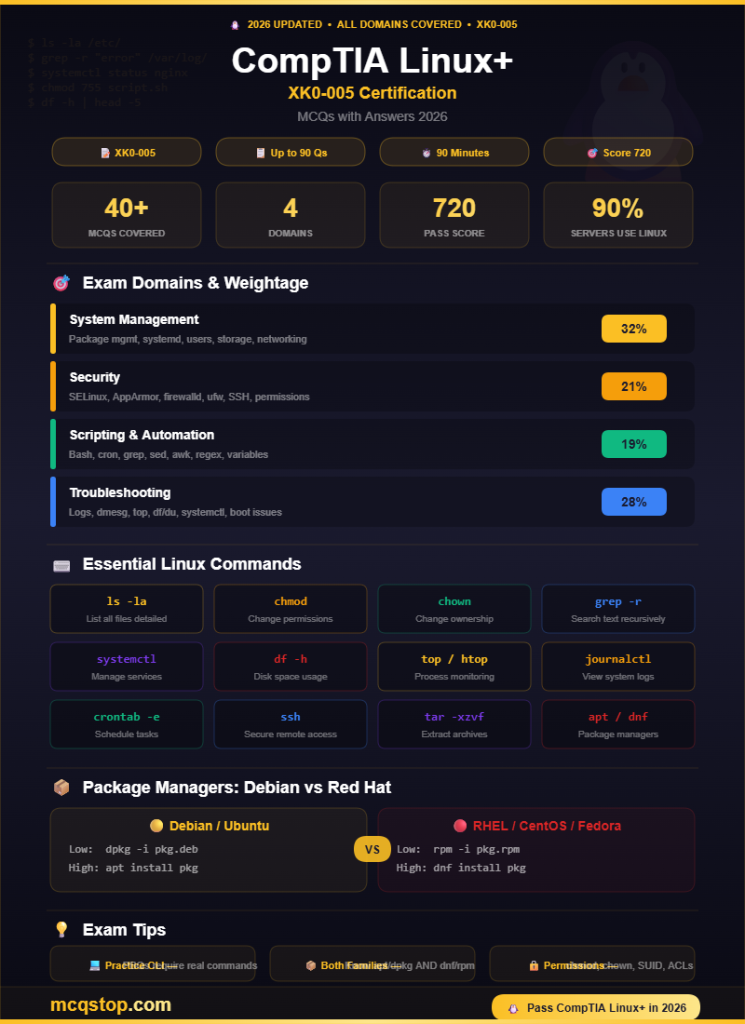
contents
permissions
patterns
processes
a process
compress files
connection
interfaces
💡 CompTIA Linux+ Exam Tips
🎯 Keep Practicing — More MCQs Available!
We update our question bank regularly to match the latest CompTIA exam objectives
Frequently Asked Questions
Linux+ (XK0-005) is considered a moderately difficult exam. It has a maximum of 90 questions (multiple-choice and performance-based) with a 90-minute time limit. The passing score is 720 out of 900. Most candidates with 6-12 months of Linux experience need 2-3 months of preparation. The PBQs require typing actual Linux commands, making hands-on practice essential.
Yes — Linux skills are in massive demand. Over 90% of public cloud workloads run on Linux, and it dominates DevOps, cybersecurity, and cloud engineering. Linux+ is vendor-neutral (covers Ubuntu, RHEL, SUSE, etc.), recognized by the US DoD under 8140, and is a stepping stone to advanced certs like RHCSA and LFCS. Average salary for Linux-certified professionals ranges from $70,000 to $100,000.
No official prerequisites exist, but CompTIA recommends at least 12 months of hands-on Linux experience. Having CompTIA A+ and Network+ provides a solid foundation but is not required. If you are already comfortable navigating the Linux command line, managing files, and understanding basic networking concepts, you can attempt Linux+ directly.
Yes, CompTIA Linux+ is valid for 3 years. To renew, earn 30 Continuing Education Units (CEUs), pass a higher-level CompTIA certification, or retake the exam. CompTIA also offers CertMaster CE, an online learning program that automatically renews your certification upon completion.




Leave a Comment