☁️
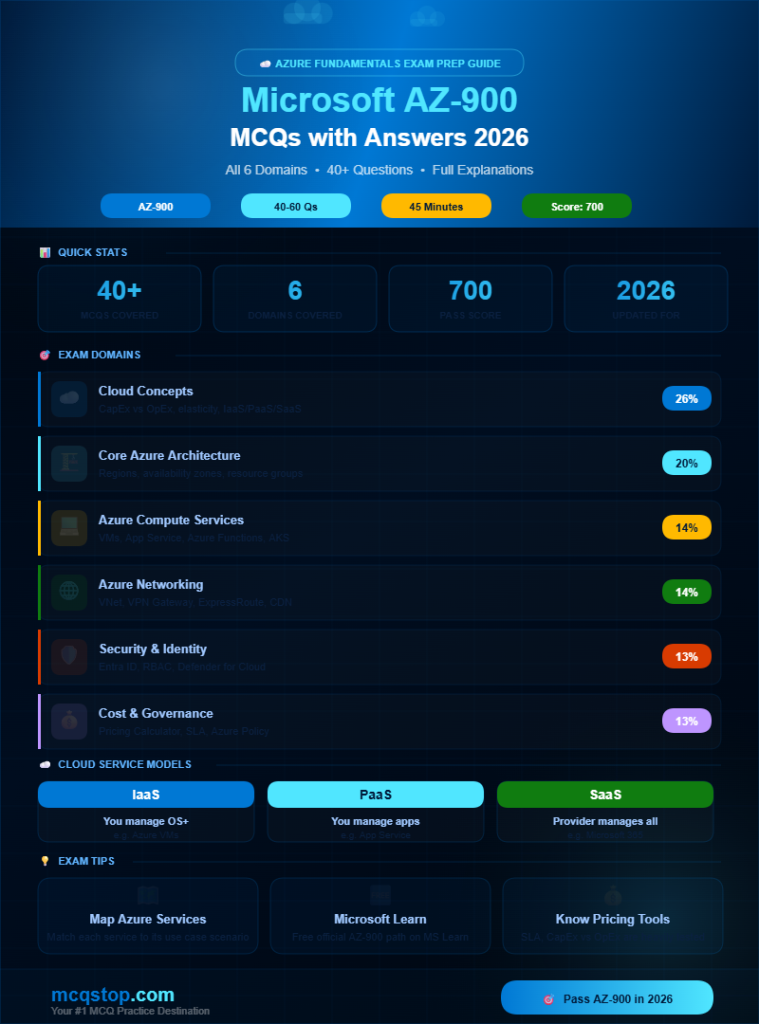
Domain 1 — Cloud Concepts
What cloud is, service models, deployment models, and cloud benefits
Question 01
What is the key advantage of cloud computing over traditional on-premises infrastructure?
ACloud computing is always completely free for all users
BIt offers high availability, scalability, and a consumption-based pricing model that eliminates large upfront hardware investments ✅
CCloud computing requires no internet connection to operate
DIt stores all data locally on the organization’s own servers
💡 ExplanationCloud computing’s biggest advantages are agility, scalability, and the shift from capital expenditure (CapEx) to operational expenditure (OpEx). You pay only for what you consume, can scale instantly, and benefit from Microsoft’s globally distributed infrastructure with built-in redundancy.
Question 02
What is “elasticity” in cloud computing?
AThe flexibility to move data between different cloud providers
BThe ability to automatically scale computing resources up or down based on current demand without manual intervention ✅
CThe capacity to store unlimited data at zero cost
DThe ability to stretch physical servers to handle more workloads
💡 ExplanationElasticity means the cloud automatically adds or removes resources in real time — for example scaling up during a product launch traffic spike and scaling back down immediately afterwards. You only pay for the resources used during the peak period, not for idle capacity.
Question 03
Which cloud service model gives the customer the most control over the operating system and installed applications?
ASaaS — Software as a Service
BPaaS — Platform as a Service
CIaaS — Infrastructure as a Service ✅
DFaaS — Function as a Service
💡 ExplanationIaaS provides virtual machines, storage, and networking — giving customers full control over the OS, middleware, and applications they install. PaaS manages the OS for you, and SaaS manages everything including the application itself. More control means more customer responsibility.
🏗️
Domain 2 — Core Azure Architecture
Regions, availability zones, resource groups, subscriptions, and Azure hierarchy
Question 04
What is an Azure Region?
AA single physical data center owned by Microsoft
BA geographical area containing one or more data centers that are close together and connected by a low-latency network ✅
CA Microsoft office location where customers can visit their cloud resources
DA billing boundary that separates Azure subscriptions by country
💡 ExplanationAzure has over 60 regions globally — more than any other cloud provider. Each region contains multiple data centers. When you deploy resources you choose a region — allowing you to place data close to your users for lower latency and comply with data residency regulations.
Question 05
What is an Azure Availability Zone?
AA physically separate data center within an Azure region — each with independent power, cooling, and networking to protect against local failures ✅
BA geographic area where Azure services are not yet available
CA pricing tier that gives customers access to premium Azure support
DA time zone setting for scheduling Azure automation tasks
💡 ExplanationAvailability Zones protect applications and data from data center failures. By deploying resources across multiple zones within the same region you ensure that even if one physical building fails your application remains available — providing a 99.99% SLA.
Question 06
What is an Azure Resource Group?
AA team of Microsoft engineers responsible for managing Azure services
BA logical container that holds related Azure resources for an application or project — enabling unified management, billing, and access control ✅
CA physical server rack inside an Azure data center
DA billing account used to receive monthly Azure invoices
💡 ExplanationResource Groups are organizational containers. When you delete a resource group all resources inside it are deleted together. You can apply access policies and cost tags at the resource group level — making it easy to manage all components of an application as a single unit.
💻
Domain 3 — Azure Compute Services
Virtual Machines, Azure App Service, Azure Functions, and containers
Question 07
What is Azure App Service used for?
AStoring large unstructured files like images and videos
BA fully managed PaaS platform for building, deploying, and scaling web apps, REST APIs, and mobile backends without managing server infrastructure ✅
CRunning containerized applications using Kubernetes orchestration
DCreating and managing virtual machines for enterprise workloads
💡 ExplanationAzure App Service supports multiple languages including .NET, Java, Python, PHP, and Node.js. It automatically handles load balancing, auto-scaling, OS patching, and security certificates — letting developers focus entirely on writing code rather than managing infrastructure.
Question 08
What is Azure Functions and when would you use it?
AA tool for managing user roles and permissions in Azure Active Directory
BA serverless compute service that runs small pieces of code triggered by events — you only pay for execution time, not idle server time ✅
CA fully managed relational database service for structured data
DA monitoring dashboard for tracking Azure resource performance
💡 ExplanationAzure Functions is ideal for event-driven workloads — like processing a new file upload, responding to an HTTP request, or reacting to a database change. Since it is serverless there is zero server management and you are billed only for the milliseconds your code actually runs.
🌐
Domain 4 — Azure Networking Services
Virtual Networks, VPN Gateway, ExpressRoute, and Azure CDN
Question 09
What is an Azure Virtual Network (VNet)?
AAn isolated private network environment in Azure that enables secure communication between Azure resources, the internet, and on-premises networks ✅
BA tool for creating virtual reality environments in the Azure cloud
CA monitoring service that tracks network traffic costs in real time
DA Microsoft service for connecting different cloud providers together
💡 ExplanationAzure VNets are the foundation of private networking in Azure. They allow Azure resources to securely communicate with each other, with on-premises infrastructure via VPN or ExpressRoute, and with the internet — all within a defined network boundary you control.
Question 10
What is the difference between Azure VPN Gateway and Azure ExpressRoute?
AVPN Gateway connects on-premises to Azure over the public internet using encryption, while ExpressRoute provides a private dedicated connection bypassing the internet entirely ✅
BThey are two different names for the exact same Azure service
CExpressRoute is cheaper than VPN Gateway in all usage scenarios
DVPN Gateway only works within a single Azure region
💡 ExplanationVPN Gateway is affordable and quick to set up but shares the public internet. ExpressRoute offers dedicated private bandwidth, predictable latency, and higher security — ideal for enterprises with strict compliance or high data volume needs. ExpressRoute is significantly more expensive.
🛡️
Domain 5 — Azure Identity, Security & Compliance
Microsoft Entra ID, RBAC, Defender for Cloud, and Azure Policy
Question 11
What is Microsoft Entra ID (formerly Azure Active Directory)?
AA physical directory of Microsoft employees and their contact details
BMicrosoft’s cloud-based identity and access management service used to manage user accounts, authentication, and access to apps and resources ✅
CA database service for storing active business transaction records
DA tool for monitoring Azure resource costs and billing activity
💡 ExplanationMicrosoft Entra ID is the backbone of identity in Azure. It enables Single Sign-On (SSO) to thousands of apps, supports Multi-Factor Authentication (MFA), and integrates with on-premises Active Directory. Every Azure subscription is automatically associated with an Entra ID tenant.
Question 12
What is Role-Based Access Control (RBAC) in Azure?
AA system that assigns identical permissions to every user in an organization
BA system that grants users access to Azure resources based on their assigned role — ensuring they only have the permissions needed for their job ✅
CA tool for tracking which users have logged into the Azure portal
DA billing method that charges users based on the roles they hold
💡 ExplanationRBAC implements the principle of least privilege in Azure. Built-in roles include Owner (full access), Contributor (manage resources but not access), and Reader (view only). You can also create custom roles for very specific permission sets across any Azure resource type.
💰
Domain 6 — Cost Management & SLA
Azure pricing, Cost Management, SLA, TCO calculator, and governance tools
Question 13
What is an Azure Service Level Agreement (SLA)?
AA legal document describing the maximum number of users allowed per subscription
BMicrosoft’s formal commitment to provide a defined minimum level of service availability, typically expressed as an uptime percentage such as 99.9% or 99.99% ✅
CA billing agreement that fixes the monthly price of Azure services
DA certificate that proves your organization is compliant with ISO standards
💡 ExplanationSLAs define Microsoft’s uptime commitments for each Azure service. If Microsoft fails to meet the SLA customers receive service credits as compensation. A 99.9% SLA means approximately 8.7 hours of allowed downtime per year while 99.99% means only about 52 minutes per year.
Question 14
What is the Azure Pricing Calculator used for?
AEstimating the monthly cost of Azure services before deploying them by selecting services, configurations, and usage patterns ✅
BComparing your current Azure bill against last month’s spending
CCalculating the number of users your Azure subscription can support
DConverting your on-premises server costs into Azure credits
💡 ExplanationThe Azure Pricing Calculator at azure.microsoft.com/en-us/pricing/calculator lets you build a custom estimate by choosing services, regions, tiers, and expected usage. The Azure TCO Calculator helps compare the cost of running workloads on-premises versus on Azure.
Question 15
Which Azure tool helps you enforce organizational standards and assess compliance at scale across all your Azure resources?
AAzure Monitor
BAzure Cost Management
CAzure Policy ✅
DAzure Advisor
💡 ExplanationAzure Policy allows you to create, assign, and manage rules that enforce organizational standards — such as requiring all resources to be tagged, restricting which regions resources can be deployed in, or ensuring all VMs use approved SKUs. Non-compliant resources are flagged automatically.
Question 16
What are Azure Reserved Instances and why are they beneficial?
AVirtual machines that are reserved exclusively for Microsoft engineers
BA billing option where you commit to a 1-year or 3-year term for Azure resources in exchange for discounts of up to 72% compared to pay-as-you-go pricing ✅
CAzure servers kept in reserve for emergency disaster recovery situations
DA premium support plan that reserves a Microsoft engineer for your organization
💡 ExplanationReserved Instances are ideal for predictable, steady-state workloads. By committing to 1 or 3 years you receive substantial discounts versus pay-as-you-go rates. Azure also offers Spot Instances for interruptible workloads at even greater discounts using unused Azure capacity.





Leave a Comment